
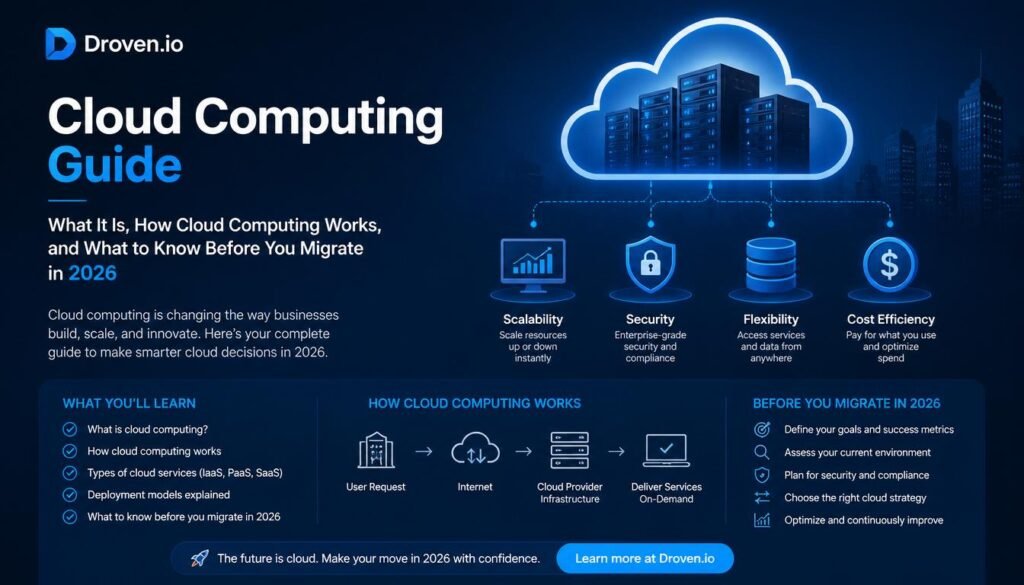
Cloud computing stopped being a “nice to have” a while back. At this point it’s just how software gets built, hosted, and shipped, whether you’re a two-person startup or a bank running fraud detection models at 3am. And if you’ve been searching around for a droven.io cloud computing guide, you’ve probably noticed the same handful of terms popping up everywhere: IaaS, PaaS, auto-scaling, Kubernetes, multi-cloud. It can feel like a lot at once.
This guide is going to walk through what Droven.io actually is (there’s some confusion out there, more on that in a second), how cloud computing works at a practical level, the service and deployment models you’ll actually need to choose between, and the security and cost mistakes that trip up almost everyone the first time they touch a cloud console. Real numbers included, not vague gestures at “the market is growing.”
What Is Droven.io, Actually?
Here’s the thing worth clearing up first: Droven.io is not a cloud provider. It doesn’t host your servers, it doesn’t sell you compute hours, and there’s no dashboard where you spin up a virtual machine. People sometimes assume otherwise, understandably, because a lot of content online frames it like a SaaS product with a signup flow and a step-by-step setup wizard. That framing is inaccurate.
What Droven.io actually is: an educational and editorial platform that publishes explainer content on cloud computing, DevOps, automation, and adjacent technology topics. Think of it less like AWS and more like a well-organized reference library — you go there to understand cloud infrastructure, then you go build on an actual provider (AWS, Azure, GCP, or somewhere smaller) using what you learned. No subscription, no vendor lock-in, because there’s nothing to lock into in the first place.
That distinction matters for this guide because it changes what “setting up Droven.io” even means. You don’t create a Droven.io account and deploy an app. You read guidance, and you apply it wherever your infrastructure actually lives.
Understanding Cloud Computing Before You Touch Anything
Before getting into service models and setup steps, it’s worth grounding this in plain language, because a surprising number of people work with cloud infrastructure daily without ever having someone explain the basic idea to them clearly.
Cloud computing means renting computing resources — servers, storage, databases, networking — over the internet instead of buying and maintaining physical hardware yourself. You don’t own the building. You rent the apartment, and someone else deals with the plumbing.
A cloud provider like AWS operates enormous data centers full of physical servers. Virtualization software slices each physical machine into many independent virtual ones, so a thousand customers can share the same underlying hardware without ever touching each other’s data or workloads. That’s the whole trick that makes cloud economics work: shared infrastructure, individually billed and isolated usage.
Why This Actually Matters More in 2026 Than It Did Five Years Ago
A few forces are pushing this from “useful” to “basically mandatory”:
- AI workloads are expensive and spiky. Training or running inference on large models needs bursts of GPU power that almost no company wants to own outright. Renting it on demand is far more realistic.
- IT spending is climbing fast. Gartner’s most recent 2026 forecast put worldwide IT spending at <cite index=”15-1″>$6.31 trillion, up 13.5% from 2025</cite>, and a big chunk of that growth is tied directly to AI infrastructure and data center investment.
- Data center systems spending specifically is exploding. The same forecast has <cite index=”15-1″>data center systems spending growing 55.8% in 2026</cite>, which tells you where the money’s actually flowing this year.
- Cloud has become the default, not the exception. One industry analysis notes public cloud now makes up roughly <cite index=”18-1″>45% of enterprise IT spending, up from just 17% in 2021</cite> — that’s a genuinely fast shift for something as conservative as enterprise IT budgets.
None of that is hype-cycle noise. It’s budget line items.
Cloud Service Models: IaaS, PaaS, SaaS, and Serverless
Every cloud decision eventually comes down to picking a service model, and honestly, this is where a lot of teams overthink things or pick wrong out of habit rather than fit.
Infrastructure as a Service (IaaS)
IaaS gives you the raw building blocks — virtual machines, storage volumes, networking — and you configure everything on top. Maximum control, maximum responsibility. You’re the landlord now, not the tenant.
Good for: enterprise applications with custom compliance needs, dev/test environments, disaster recovery setups.
Platform as a Service (PaaS)
PaaS manages the underlying servers and operating system for you. You show up with code, it handles deployment, scaling, and runtime management. Teams spend their time writing features instead of babysitting servers.
Good for: web apps, mobile backends, API projects — anything where speed to launch matters more than infrastructure customization.
Software as a Service (SaaS)
SaaS is the model most non-technical people already use without thinking about it: Gmail, Slack, Salesforce. Fully managed software, accessed through a browser, subscription-priced, zero maintenance on your end.
Serverless Computing
Serverless takes PaaS a step further by removing the concept of a “server” from your mental model entirely. Code sits dormant until triggered, runs for a fraction of a second, then shuts down. You’re billed on execution time, not idle hours.
The tradeoff: cold-start latency (that first request after idle time can lag), vendor-specific tooling that’s harder to migrate away from, and execution time caps that make it a poor fit for long-running processes.
| Service Model | Who Manages What | Best Fit |
|---|---|---|
| IaaS | You manage OS, runtime, apps; provider manages hardware | Custom infrastructure, compliance-heavy workloads |
| PaaS | Provider manages OS and runtime; you manage app code | Web and mobile app development |
| SaaS | Provider manages everything | End-user software, no engineering involvement needed |
| Serverless | Provider manages servers entirely; you manage functions | Event-driven, unpredictable-traffic workloads |
Cloud Deployment Models: Public, Private, Hybrid, Multi-Cloud
Choosing a service model answers “what layer do I manage.” Choosing a deployment model answers “whose infrastructure, and how much do I share it.”
Public cloud — resources shared across many customers on infrastructure owned by AWS, Azure, GCP, etc. Cheapest to start, fastest to scale, least control over the physical layer.
Private cloud — dedicated infrastructure for a single organization, either on-premises or hosted by a third party exclusively for you. More control, stronger compliance posture, but noticeably higher cost.
Hybrid cloud — a mix of public and private, letting sensitive workloads stay private while everything else runs public. This is genuinely common in regulated industries like healthcare and finance.
Multi-cloud — using more than one public cloud provider simultaneously, often to avoid vendor lock-in or meet geographic and redundancy requirements. Gartner analysts have flagged multicloud governance as one of the trickier operational headaches heading into 2026, particularly as <cite index=”10-1″>over 60% of enterprises are expected to run AI model activity in one cloud while leveraging data in another by 2030</cite>, up from under 10% today. That’s a real complexity curve, not a theoretical one.
One trend worth calling out specifically: sovereign cloud. Gartner forecasts worldwide sovereign cloud IaaS spending will <cite index=”11-1″>reach $80 billion in 2026, a 35.6% jump from 2025</cite>, largely driven by organizations outside the US and China wanting more control over where their data physically sits. If your business operates across borders, this is a category worth having on your radar even if it doesn’t affect you yet.
Core Cloud Infrastructure Components You’ll Actually Configure
Whatever provider you land on, you’ll be working with roughly the same building blocks.
Compute — virtual machines, containers, Kubernetes clusters, serverless functions. This is where your application logic actually executes.
Storage — object storage for files and backups, block storage for databases and VMs, file storage for shared directories. Picking the wrong type for the job is a surprisingly common (and surprisingly expensive) beginner mistake.
Networking — virtual private clouds, firewalls, load balancers, DNS. This is your security perimeter as much as it is your plumbing.
Security controls — encryption, identity and access management, threat detection. Not optional, not an afterthought, not something you bolt on in month six.
Containers deserve a specific mention here because they’ve become close to a default rather than a nice-to-have. A container packages an application together with its exact runtime dependencies, so it behaves identically whether it’s running on your laptop or across a thousand-node production cluster. Kubernetes has become the standard tool for orchestrating containers at scale — deciding where they run, restarting them when they fail, and scaling them up or down automatically.
A Realistic Setup Path for a New Cloud Deployment
Since Droven.io itself isn’t something you configure, this section walks through what setting up an actual cloud environment (on a provider like AWS, Azure, or GCP) tends to look like in practice. The steps stay pretty consistent across providers even though the exact menus differ.
- Create and secure your account. Enable multi-factor authentication immediately — not after you’ve deployed something, immediately. This single step blocks a huge share of account compromise attempts.
- Separate your environments. Development, staging, and production should never share the same resources. It sounds obvious until someone accidentally runs a test script against the production database.
- Start small on compute and storage. Oversized instances are one of the most common (and most quietly expensive) beginner mistakes. You can scale up. Scaling down after overspending for six months is a much worse conversation to have with finance.
- Configure networking before deploying anything public-facing. Firewalls, VPCs, and access policies should exist before your first workload goes live, not after an incident forces the issue.
- Choose storage types deliberately. Object storage for media and backups, block storage for databases, file storage for shared documents.
- Deploy compute resources — VMs, containers, or Kubernetes clusters, depending on what your application actually needs.
- Implement identity and access management and encryption policies before any real data touches the environment.
- Deploy your application through a proper pipeline: build, automated test, security scan, deploy, monitor.
- Turn on monitoring from day one. Without it, problems tend to stay invisible until a customer complains, which is the worst possible way to find out something’s broken.
- Set up automated, tested backups. A backup nobody has ever restored from is really just a hope, not a plan.
Quick Pre-Launch Checklist
- MFA enabled on all accounts
- User roles and permissions scoped correctly
- Firewalls and network segmentation active
- Monitoring and alerting configured
- Backups automated and, critically, tested
- Encryption enabled at rest and in transit
- Documentation written down somewhere a new hire could find it
Managing Cloud Costs Without Wrecking Performance
Cloud bills have a habit of creeping upward quietly, and this is genuinely one of the most common complaints from teams a year or two into their cloud journey. Nobody sets out to overspend. It just accumulates — an unused staging environment here, an oversized database there.
A rough rightsizing rule that holds up reasonably well in practice:
| Utilization Level | Recommended Action |
|---|---|
| Under 30% | Downsize the resource |
| 30% to 70% | Leave it, this is healthy |
| Above 70% | Evaluate scaling up before it becomes a bottleneck |
Auto-scaling helps a lot here, since it expands capacity during demand spikes (a retailer’s Black Friday traffic, say) and contracts it back down once demand drops, rather than paying for peak capacity around the clock. Hidden costs tend to show up in a few predictable places: data transfer fees, snapshot retention, and forgotten dev environments nobody remembered to shut down. A monthly audit catches most of this before it becomes a real problem.
Security Best Practices Worth Taking Seriously
Cloud providers secure the underlying infrastructure. You’re still responsible for securing what you build on top of it — this split is usually called the shared responsibility model, and misunderstanding it is where a lot of breaches actually originate.
Identity and access management should follow least-privilege by default: people and systems get only the permissions they genuinely need, nothing more “just in case.”
Multi-factor authentication is no longer optional for anything resembling production access. Passwords alone just aren’t enough anymore given how routinely they leak.
Encryption should cover data at rest, in transit, and in backups. This isn’t a checkbox exercise for compliance audits, it’s the difference between a breach being a minor incident or a genuine catastrophe.
Network segmentation limits how far an attacker can move if they do get in. Public-facing services, internal apps, and databases should sit in separate security zones, not one flat network.
Continuous monitoring catches suspicious logins, unauthorized access attempts, and configuration drift early, which is usually the difference between catching an issue in hours versus months.
“The most successful cloud deployments focus on automation, observability, and scalability rather than simply moving servers to the cloud.”
That quote captures something a lot of migrations get backwards — treating cloud as a hosting swap rather than an architectural shift changes almost nothing about how a team actually operates.
Common Mistakes New Cloud Teams Make
A few patterns show up again and again, across companies of wildly different sizes:
- Overprovisioning — bigger instances don’t automatically mean better performance, they usually just mean a bigger bill.
- Ignoring cost monitoring — if your monthly invoice is a surprise, your visibility tooling isn’t doing its job.
- Weak access controls — overly broad permissions remain one of the single most common causes of cloud security incidents.
- Backups that were never tested — plenty of teams create backups, far fewer have ever actually restored from one to confirm it works.
- No documentation — an undocumented environment becomes unmanageable the moment the one person who understood it leaves.
Cloud vs Traditional Hosting
| Feature | Traditional Hosting | Cloud Infrastructure |
|---|---|---|
| Scalability | Limited, hardware-bound | High, near-instant |
| Deployment speed | Slow, physical setup required | Fast, minutes not weeks |
| Cost model | Fixed | Usage-based |
| Global reach | Limited | Extensive, multi-region |
| Automation | Minimal | Extensive |
Traditional hosting still has a place for small, predictable workloads that never really change. But for most modern applications, especially anything customer-facing with variable traffic, cloud infrastructure just wins on flexibility and speed.
AWS, Azure, and Google Cloud: A Quick Comparison
These three dominate most cloud education content for a reason. AWS has consistently held the largest share of the worldwide cloud infrastructure market, ahead of both Azure and Google Cloud, giving it the broadest service catalog but also the steepest learning curve for newcomers. Azure tends to shine for organizations already embedded in the Microsoft ecosystem, with strong hybrid cloud support. Google Cloud is often the pick for teams leaning heavily into data analytics and machine learning workloads, given Google’s own AI research pedigree.
None of these is objectively “best” — it’s really about which one matches your existing tooling, compliance needs, and team’s familiarity.
Where Cloud Computing Is Headed in 2026 and Beyond
A handful of trends are shaping infrastructure decisions right now, not as distant speculation but as things actually showing up in budgets today.
AI-powered cloud operations — providers are increasingly using AI to predict scaling needs and flag anomalies before a human would notice.
Edge computing growth — processing data closer to where it’s generated rather than routing everything back to a central data center. One industry estimate puts edge computing spend at <cite index=”18-1″>$261 billion in 2025, projected to reach $378 billion by 2028</cite>, with close to 29% of enterprises already running edge infrastructure alongside their core cloud setup.
Sovereign and regional cloud — as covered earlier, organizations are increasingly prioritizing data residency and local control, not just cost and performance.
Industry cloud platforms — Gartner projects that more than <cite index=”18-1″>70% of enterprises will use industry-specific cloud platforms by 2027, up from under 15% in 2023</cite>, tailored toward specific sectors like healthcare or financial services rather than generic infrastructure.
Multi-cloud as the norm, not the exception — fewer organizations are betting everything on a single provider, partly for resilience and partly to avoid negotiating leverage tilting too far toward one vendor.
Frequently Asked Questions
Is Droven.io a cloud hosting provider? No. It’s an educational content platform covering cloud computing topics. You still need to choose an actual provider like AWS, Azure, or GCP to host anything.
Is cloud computing worth it for a small business? In most cases, yes, particularly because you avoid upfront hardware costs and only pay for what you actually use. The math gets murkier for very simple, low-traffic sites where basic shared hosting might genuinely be cheaper.
What’s the biggest mistake beginners make with cloud infrastructure? Oversizing resources out of caution, then never revisiting them. Start smaller than feels comfortable and scale based on real usage data.
How long does cloud infrastructure take to set up? A basic environment can be running in under an hour. A properly secured, production-ready setup with monitoring, backups, and access controls takes considerably longer, and rushing that part is where most early security problems come from.
Does cloud computing support AI workloads well? Yes, and this is arguably the single biggest driver of cloud growth right now, since renting scalable compute for training and inference is far more practical than most organizations buying dedicated hardware.
What’s the difference between multi-cloud and hybrid cloud? Hybrid combines public and private infrastructure. Multi-cloud means using more than one public cloud provider simultaneously. They solve different problems and aren’t mutually exclusive.
Wrapping Up
Cloud computing in 2026 isn’t really a debate anymore about whether to adopt it, it’s about doing it deliberately instead of by accident. The teams that struggle tend to be the ones treating cloud migration as a lift-and-shift exercise rather than rethinking how their infrastructure actually needs to work. Resources like Droven.io exist precisely to fill that education gap before you’re staring at an unexpected bill or a security incident wondering what went wrong.
Start with the fundamentals covered here: pick the right service model for the job, choose a deployment model that actually matches your compliance needs, build security in from the start rather than bolting it on later, and keep an eye on costs before they become a surprise. That’s most of the battle, honestly. The rest is just experience.